Splay · stereo widener plugin
Expand from mono to a stereo field, with no latency.
Splay widens a sound with phase instead of delays or reverb. One control sets how wide, another sets which frequencies open, all without compromising your mono compatibility. Need more than one setting? Split the spectrum into up to eight sections, each with its own controls.
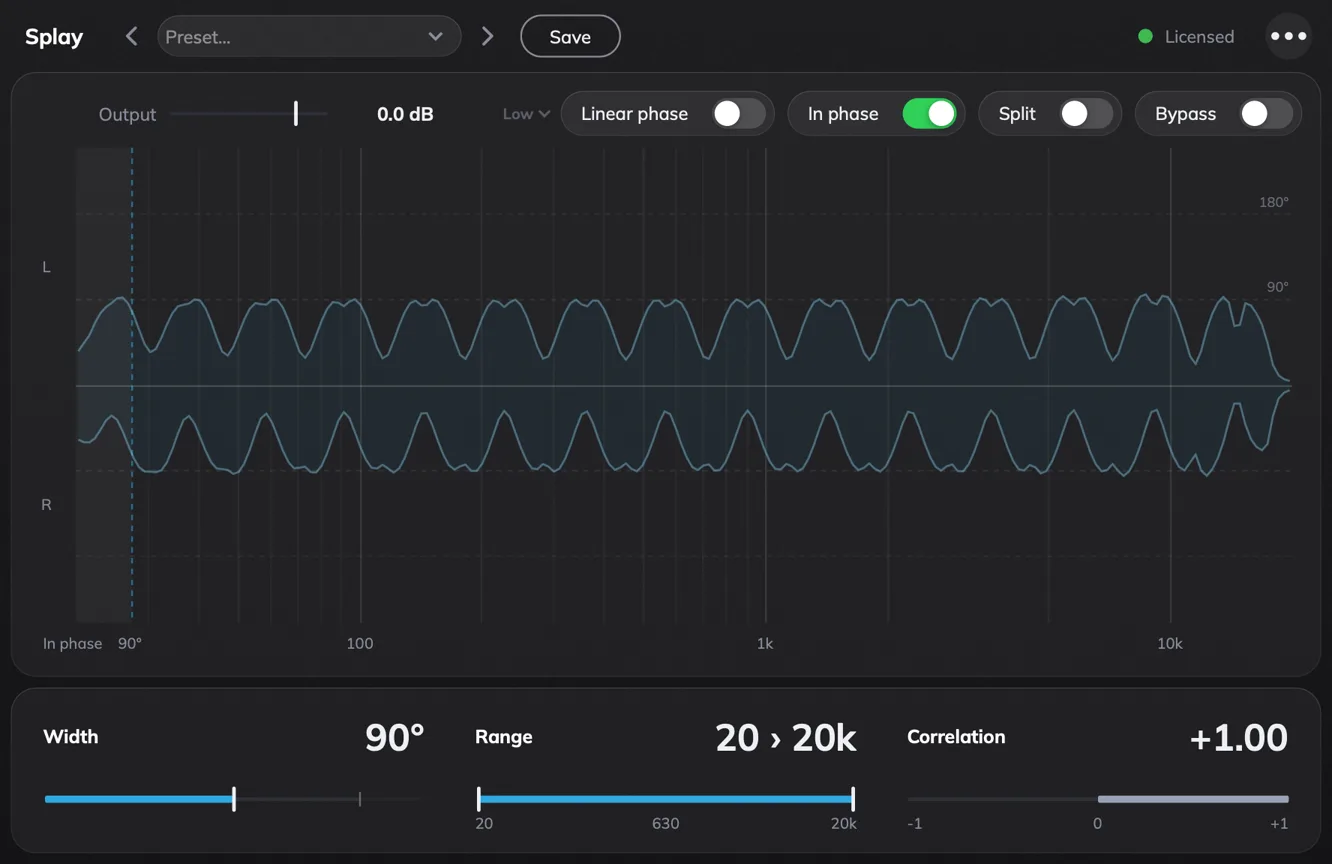
The whole plugin. The display shows where the sound opens, frequency by frequency: left channel above the line, right channel below. Drag the curve to set the width.
Our approach
Width made with a clean method.
Most ways of turning one channel into two add something to the sound: a short delay, a chorus, a little room. They work until the mix is played in mono, or until the transient you cared about comes out smeared.
Splay adds nothing. It shifts the phase of the left and right channels in opposite directions, by the same fraction of a wavelength at every frequency. A quarter of a wavelength at 200 Hz, a quarter of a wavelength at 8 kHz. Both channels keep the level of the source, so the image opens without leaning to one side.
Because the rule is simple, the controls are too. Width is the angle between the two channels. Range is the part of the spectrum that opens. The display shows the result before you trust your ears with it.
Why Splay
Three things it does not give up
Phase
The same shift at every frequency
Up to 170 degrees between left and right, with the same amount of phase shift. Ideal for placing precisely a sound in the stereo field.
In phase
Keep it mono-compatible
With In phase on, you keep the signal mono-compatible. With split engaged, choose what's important to keep for mono and what can spread from you original signal.
Latency
Zero samples, live or in the studio
Short recursive filters only, with no block processing and no lookahead. Put it on a vocal on stage or on forty tracks in a session.
Try the controls
Move Width and Range, watch the sound open
This is the plugin's own display, computed in this page with the same filters. It shows the response, it does not play sound.
In phase Width 90°
The thin line is the opening at each frequency, on a scale from 0 to 180 degrees: on the centre line the sound is mono, on the first dotted line left and right are a quarter of a wavelength apart. Width stops at 170 degrees, or 150 with In phase on. With In phase on, the opening ripples from one third of an octave to the next. Switch it off to see the constant shift. In the plugin, the spectrum of your sound colours that shape as it plays.
Width
One angle, the same for every note
Width sets the angle between left and right, in degrees, and Splay opens at 90. At 90 degrees the two channels of a mono source are fully decorrelated. Go further and they move towards opposite polarity: wider still, at the expense of the mono sum, so Splay stops at 170 degrees, or 150 with In phase on.
The shift is a fraction of the wavelength, so it is long in time for a bass note and very short for a cymbal. Each channel keeps the level of the source at every frequency: the image opens from the centre and stays centred. Set it with the slider, or drag the curve in the display, away from the centre line to open and towards it to close.
Range
Choose where the sound opens
Range has two handles, from 20 Hz to 20 kHz. Between them the sound opens. Outside them it stays where it was. Keep the low end of a bass in the centre and open its harmonics. Open the body of a pad and leave the air alone.
The edges are phase matched with the rest of the signal, so the image does not tilt where the range starts and stops.
In phase
Wide in stereo, untouched in mono
Switch In phase on and Splay leaves the source as it is, then adds a side signal to the left and takes the same signal away from the right. Summed to mono, the two cancel and the input comes back exactly. Left and right come out a little louder as the image opens, about 2 dB at 90 degrees.
Switch it off for the purest phase shift, constant across the range. The mono sum then keeps the spectrum of the source and drops by 3 dB at 90 degrees, more beyond. It is your call, mix by mix, and the Output control brings the level back where you want it.
Stereo sources
It reads what is already there
On a stereo track nothing is summed to mono first. Splay measures how close the two channels are and adds only the phase that is missing to reach the width you asked for.
A mono source gets the full angle. A narrow stereo source gets part of it. A source that is already as wide as your setting passes through as it is. The correlation meter shows the result at the output.
Split
A different width for every part of the spectrum
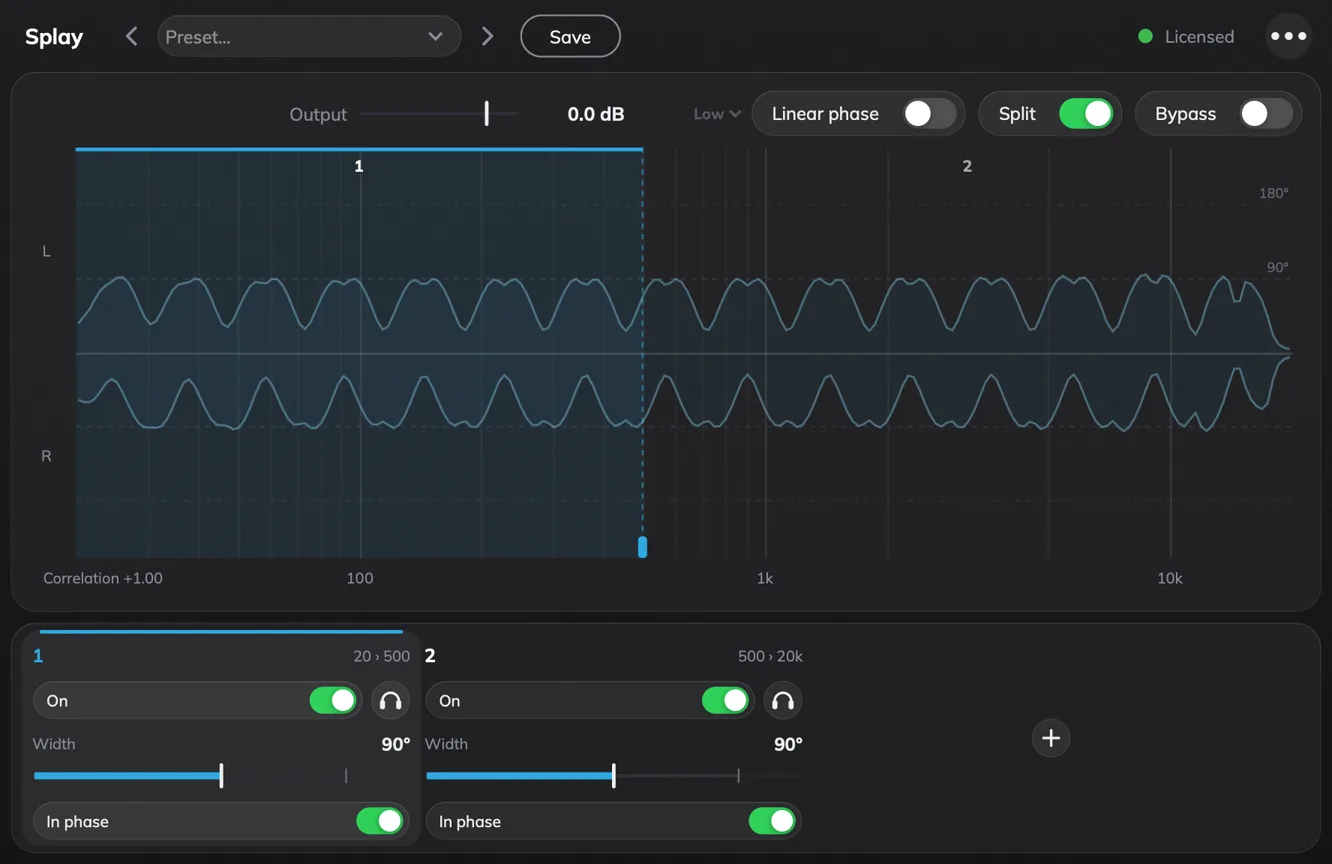
Double click anywhere in the display and Splay switches to Split, with a crossover where you clicked: the display becomes a crossover editor, like the bands of an EQ. Add the others where you need them, up to seven crossovers and eight sections. Double click to add one, drag it to move it, select a section and press Delete to take it away, or press the + button to cut the chosen section in two.
Every section has its own column, always in view: On, Width and In phase. Keep the kick and the bass in the centre, open the guitars wide, give the air a little less. Click a section to bring its column forward, drag its curve to set its width, right click it to delete it.
The round headphone button next to On plays that section alone, so you hear exactly what you are opening before you put it back in the mix.
Pricing
One-time payment, no subscription fees.
One plugin, one price, every feature on this page.
License
80 €
permanent license
- VST3, Audio Unit and AAX, macOS and Windows
- Mono to stereo and stereo to stereo
- Split mode, up to eight sections
- Activation on 2 machines, online or offline
Free trial
15 days
the complete plugin, no feature held back
- Try it on your own sessions
- Check your mixes in mono before you decide
- Buy a license later and keep your settings
- One trial per person and per product
Specifications
Small, exact, and out of the way
A native C++ engine made of recursive filters. No block processing, no reported latency.
| Channel layouts | Mono to stereo · stereo to stereo |
|---|---|
| Width | Phase angle between left and right, 0 to 180 degrees on the scale, 90 when loaded · stops at 170 degrees, 150 with In phase on · slider or drag the curve |
| Range | Two handles, 20 Hz to 20 kHz, one octave apart at least · phase matched edges |
| In phase | On: left plus right is the input, sample for sample, left and right about 2 dB louder at 90 degrees · Off: constant phase shift, mono sum 3 dB lower at 90 degrees, more beyond |
| Split | 1 to 7 crossovers, 2 to 8 sections · crossovers from 40 Hz to 16 kHz, one third of an octave apart at least · Linkwitz-Riley, 24 dB per octave, phase aligned between sections |
| Per section | On · Width 0 to 180 degrees, same stops · In phase · listen to the section alone |
| Stereo input | Input correlation measured continuously · only the missing phase is added |
| Output | −24 to +6 dB, after the processing · back to 0 dB in bypass |
| Latency | 0 samples · with Linear phase: 1151 samples in Low (24 ms at 48 kHz) or 4223 in High (88 ms), reported to the host |
| Display | Opening by frequency, left above and right below, 0 to 180 degrees · input spectrum in colour · output correlation · crossover editor in Split mode |
| Window | 888 × 576 points · factory and user presets |
| Bypass | Click free, 20 ms crossfade |
| Sample rates | 44.1 to 192 kHz |
| Formats | VST3 · Audio Units (Imaging category, macOS) · AAX (Sound Field category) |
| License | Permanent · 2 activations · 15 day trial, once per person |
| Platform | macOS 12 or later, Apple silicon and Intel · Windows 10 and 11, 64-bit |